Features
Everything a delivery contractor runs, in one app.
Messaging, scheduling, payroll, hiring and fleet share the same people, locations and permissions. Here is what each part does.
Stop 1 of 5 · Team messaging
Keep every location talking.
LastStop sets up the right conversations for you, so managers and office staff reach each other without a separate chat app.
- Channels made for you. One company-wide channel, plus a channel for each location that includes that location’s managers.
- Direct messages. Any two people with access can talk one to one, and only those two can read it.
- Never miss a message. Unread counts on every chat, and a marker that shows where the new messages start.
- Talk about an applicant. Attach an applicant to a message so everyone knows who you mean. People outside that location see only “an applicant”.
- A record you can rely on. Messages can’t be edited or deleted after they’re sent.
- You decide who’s in. Give each person full, read-only or no access to messages.
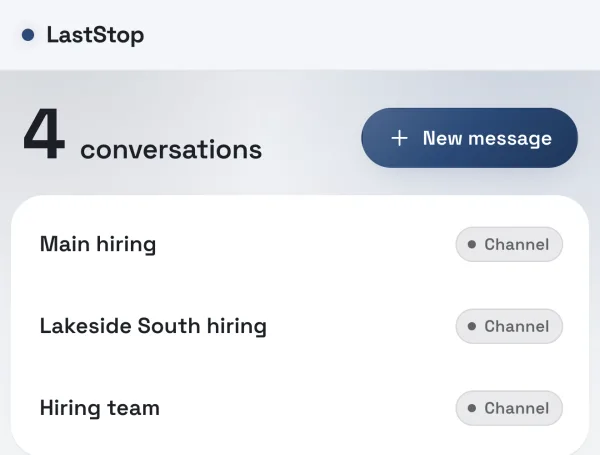
Shown with a demo company and made-up people.
Stop 2 of 5 · Scheduling
Build the week in minutes, not hours.
Plan the week route by route or person by person, then publish it so everyone works from the same version.
- Route by route. Add routes and drag a driver, helper, trainee or supervisor into each one.
- Start from what worked. Copy last week, or fill every route with its usual driver in one step.
- Publish with confidence. Publish the week, and see every change made after it went out.
- Track the day as it happens. Mark call-outs (excused or not, with a reason), late arrivals with the time they arrived, and anyone sent home, with notes.
- Time off on the schedule. Record paid time off and vacation right on the week.
- Locked once it’s paid. When payroll for a week is approved, that week’s schedule locks so the record matches the pay.
- Route 101On timeDriver Dana R. · Helper Luis P.
- Route 102Late, 8:42 AMDriver Kim T.
- Route 103Call-outDriver Sam W. · excused, family
- Route 104TrainingTrainee Jo B. with Chris N.
Stop 3 of 5 · Payroll
Get pay right before it goes out.
Set your pay rules once. LastStop works out each person’s pay, flags anything that looks wrong, and won’t let a week be approved until it’s settled.
- Pay rules that match how you pay. Day rate or weekly salary, stop thresholds with tiered per-stop bonuses, sixth-day pay, per diem and pay for helping on another route.
- Set once, adjust where needed. Set rules for the whole company, a location, a type of driver, a route or one person. The most specific rule wins, and every change is dated.
- Checks built in. Overtime rules by state, and a minimum-wage check for each location.
- Flags before money moves. Anything unusual is flagged for review, and a week can’t be approved while a flag is open, a rate is missing or a day’s figures are missing.
- Compare before you commit. Preview a rule change against last week before you save it, and look back through the history of every setting.
- Ready for your payroll provider. An approved week becomes a file for your payroll provider and a saved archive. LastStop doesn’t move money; your payroll provider still pays your people.
- Dana R.Ready6 days · day rate + stop bonus
- Kim T.Check5 days · one day missing stops
- Sam W.Ready5 days · weekly salary
- Luis P.Ready6 days · helper rate + per diem
Stop 4 of 5 · Hiring
From first call to first day.
Every applicant, every location and every step, in one list your whole hiring team shares.
- Your stages, your words. Set your own hiring statuses and group them into stages, from applied to hired.
- The full story on every applicant. Contact details, notes, every call, text, voicemail and email logged, and a field-by-field history of changes.
- Follow-ups that don’t slip. Each contact sets the next follow-up date for you, and a queue shows who to reach out to today.
- Documents in the right hands. Add PDFs and photos to an applicant’s file. Sensitive documents open only for the people you name.
- Offers signed online. Approve an offer and send the link. The new hire signs from their phone, gets a signed PDF, and moves on to an onboarding checklist.
- A weekly recap. See the week’s contacts, progress and hires by location and by recruiter.
- Tidy without losing anything. Quiet applicants are archived after the number of days you choose, never deleted, and a phone number can’t be entered twice.
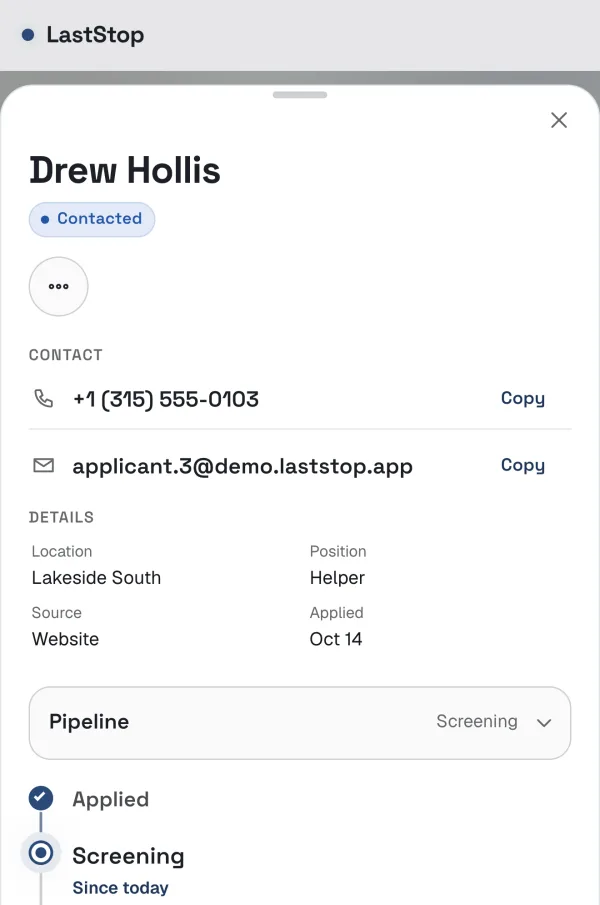
Shown with a demo company and made-up people.
Stop 5 of 5 · Fleet
Every vehicle ready to roll, paperwork included.
Keep your vehicles and the documents that keep them legal in one place, with expiry dates you can’t miss.
- Every vehicle in one list. Number, VIN, type, year, make, model, plate, registration state and location, and whether it’s running or down, with a note.
- Vehicle paperwork. Registration, insurance card and annual inspection, each with its expiry date. New copies go on top and old ones are kept.
- Driver documents. Licenses, medical cards, qualification certificates and more, each with issue and expiry dates.
- See what’s expiring. One list of everything expired, due within 30 days, due in 31 to 60 days, or missing.
- Move in fast. Upload files in bulk and import your vehicles from a spreadsheet.
- Every change on record. Old and new values are kept for each change, and vehicles are archived rather than deleted.
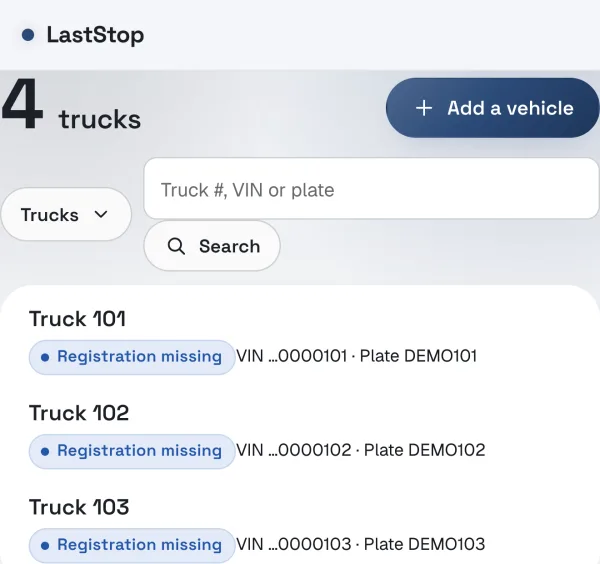
Shown with a demo company and made-up people.
Across the whole app
The same rules everywhere.
These work the same way in every part of LastStop.
Page-by-page access
Give each person no access, view or edit on each page. LastStop enforces it on the server.
Locations
Limit people to the locations they cover, and every page filters to match.
More than one company
Each company is walled off with its own name and look, and administrators switch between companies in one click.
Phone and desktop
Works in any up-to-date browser and installs to your home screen like an app.
Change history
Edits, sign-ins and administrator actions are recorded with who and when.
Your copy, any time
Administrators can download the company’s records as spreadsheet files in one zip.
Security
Encrypted connections, hashed passwords, sign-in limits, one-time invitation links and sessions that time out.
Archived, not deleted
When a plan changes or someone leaves, records are archived and can come back.
See how LastStop would work for your company.
Tell us how many locations you run and which parts matter most to you. We’ll walk you through it and set up your company.